What this calculator does
Percentages show up in discounts, tips, taxes, test scores, pay raises, and news reports. This tool covers the three calculations people need most often, with a plain explanation of each. You can switch modes without re-entering the formula, which makes it easy to check a number from a different angle. The calculator uses exact arithmetic and rounds only for display, so you can see how a result was reached.
Is this the right calculator?
Use it when
- You need a percentage of a number, a percentage change, or a percentage comparison.
- You want a quick answer for a discount, tax, tip, or grade.
Use something else when
- You need compound growth over time rather than a single percentage change.
- You need a statistical percentile rather than a percentage of a total.
What changes the result most
| Base value | The same percentage produces a larger amount on a larger base. |
|---|---|
| Percentage rate | The rate scales the result directly. |
| Direction | An increase and a decrease of the same percentage do not cancel out. |
How to use it
- Choose the mode that matches your question.
- Enter the two values. The labels change with the mode.
- Read the result and the short explanation of the formula.
- Switch modes to check the same numbers a different way.
- Round the answer as needed for your situation.
How it works
Example calculations
Example 1: percent of a number
What is 15% of 80? Multiply 80 by 15 and divide by 100. The answer is 12. This is the mode to use for a discount, a tip, or a sales tax amount.
Example 2: one number as a percent of another
12 is what percent of 80? Divide 12 by 80 to get 0.15, then multiply by 100. The answer is 15%, which confirms the first example from the other direction.
Example 3: percent change
Going from 80 to 100 is a 25% increase, because the change of 20 is divided by the starting value of 80. Going from 100 back to 80 is a 20% decrease, because the same change of 20 is now divided by 100.
What the result means
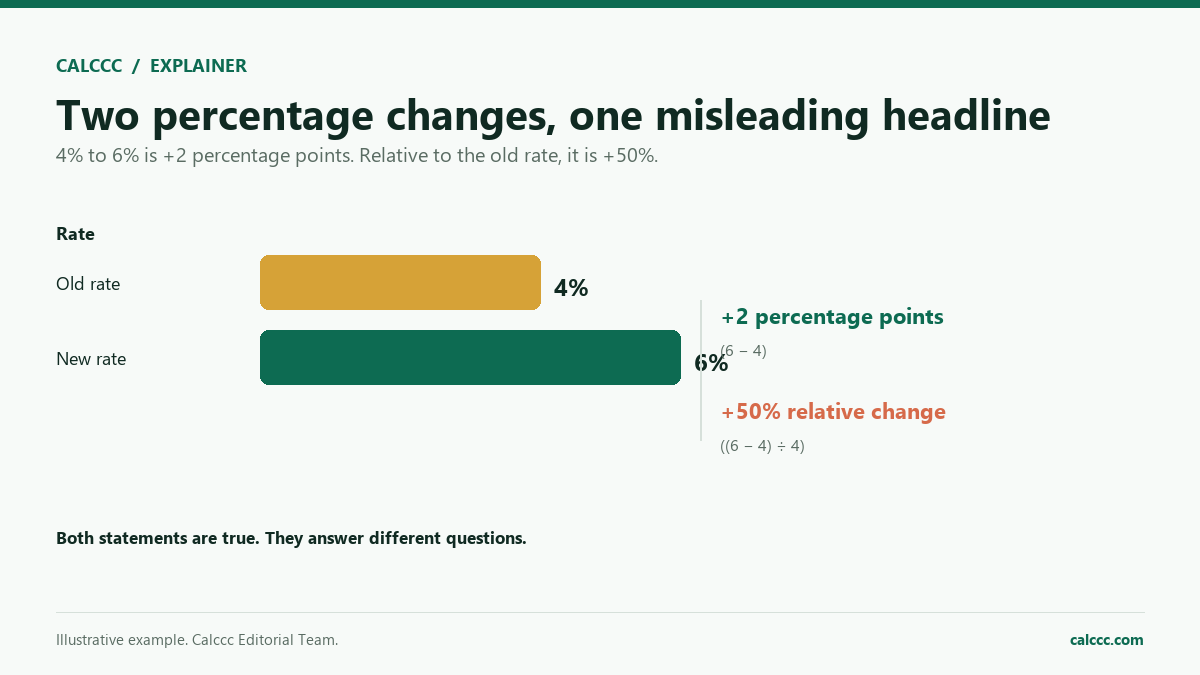
The base matters. A 20% increase followed by a 20% decrease does not return to the original number, because the second percentage applies to a larger base. Percent change always compares the change with the starting value, so a move from 100 to 120 is a 20% increase, but a move from 120 to 100 is a 16.7% decrease. Percentages are not the same as percentage points: a rate that rises from 5% to 6% has risen by 1 percentage point, but by 20% in relative terms. Use the mode that matches the question, and be clear about which number is the base before you compare results.
Common mistakes
- Using the ending value instead of the starting value as the base for percent change.
- Adding percentages that apply to different bases, such as two discounts taken one after the other.
- Confusing percentage points with percent change.
- Moving the decimal point the wrong way when converting a percent to a decimal.
- Assuming a 25% increase is undone by a 25% decrease.
Assumptions and limits
- The values are simple numbers, not percentages that compound over time.
- Y is not zero when dividing to find a percent or a percent change.
- Percent change is measured relative to the starting value X.
- Results are rounded for display only, after the calculation.
- The calculator does not apply tax, tips, or discounts automatically.
Frequently asked questions
What is the difference between percent and percentage points?
A percentage point is the arithmetic difference between two percentages. If a rate moves from 5% to 6%, it rises 1 percentage point but 20% in relative terms. News stories often mix the two.
How do I find the original price after a discount?
Divide the sale price by 1 minus the discount rate. For example, a $60 sale price after 25% off means 60 / 0.75 = $80. This calculator's percent-change mode can check the result.
Why is a 20% increase not canceled by a 20% decrease?
The increase is applied to the original number, while the decrease is applied to the larger result. Starting at 100, a 20% increase gives 120, and 20% off 120 gives 96, not 100.
How do I calculate a percentage change?
Subtract the starting value from the ending value, divide by the starting value, and multiply by 100. A positive answer is an increase and a negative answer is a decrease.
Can a percentage be more than 100?
Yes. A value can be more than 100% of another, such as 150 is 150% of 100. Percent change can also exceed 100% when a value more than doubles.
How do I add a sales tax to a price?
Multiply the price by 1 plus the tax rate as a decimal. For a 7% tax, multiply by 1.07. The percent-of mode gives the tax amount alone, which you can add to the price.
Sources
2026 update
How to use the professional output
This page is not just a formula box. The result is designed to be checked, compared, and taken away.
- Professional worksheet. The result includes the inputs used, the method and scope, and a one-variable sensitivity check for finance calculators.
- A/B scenarios. Save two input sets in the browser and compare the primary, secondary, and breakdown figures side by side.
- Print / PDF and CSV. Print a branded worksheet, or export the year-by-year table when the calculator produces one.
The formulas and assumptions above still govern the number. The worksheet makes the estimate auditable; it does not make it a lender quote, tax return, or personalized advice.
Part of a decision center
Math Decision Center
See the companion tools, decision guides, and patterns that go with this calculator.
Go deeper