What this calculator does
Date arithmetic looks simple until a month ends, a leap year appears, or a deadline crosses a weekend. This calculator uses calendar rules rather than assuming every month has 30 days. It is useful for notice periods, project deadlines, subscription renewals, travel dates, and any plan that says '30 days from today'.
How to use it
- Enter the starting date.
- Choose add or subtract.
- Enter a whole-number amount.
- Choose days, weeks, months, or years.
- Check the weekday and the day difference before using the date in a contract or deadline.
How it works
Example calculations
Example 1: 30 days later
January 15 plus 30 days is February 14 in a non-leap year. The calculator also shows the weekday so you can check whether the deadline lands on a weekend.
Example 2: one month from January 31
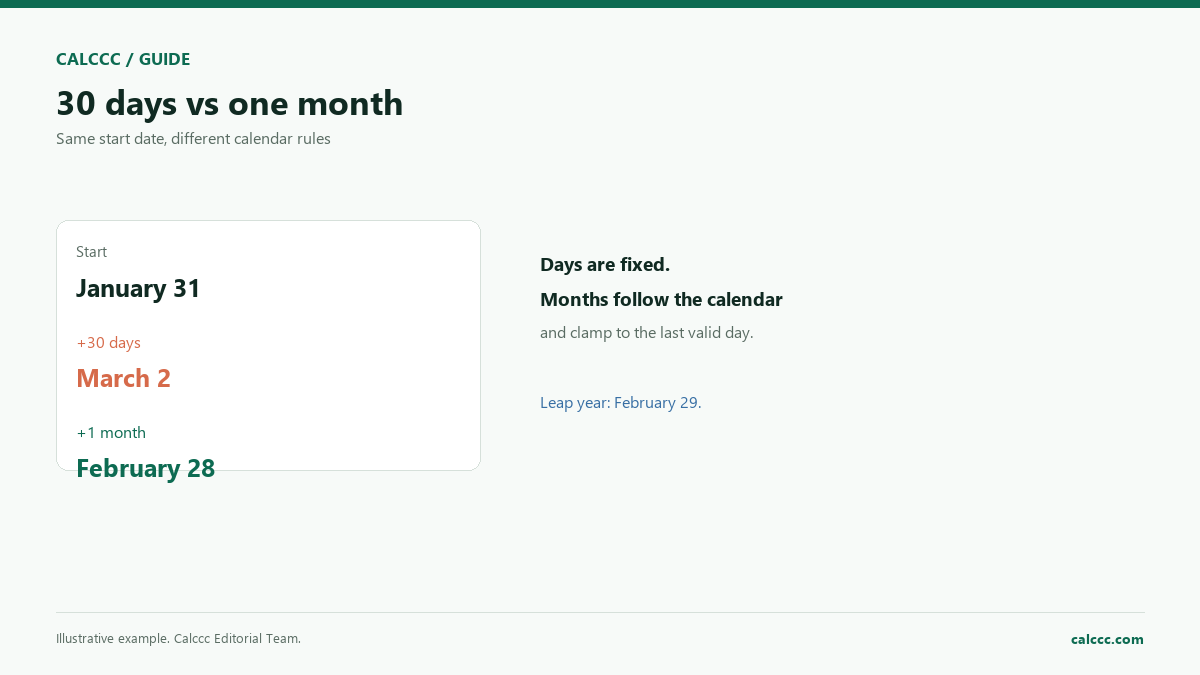
Adding one calendar month clamps to February 28, or February 29 in a leap year. The 'days from start' value will be 28 or 29, not a fixed 30.
Example 3: subtract 90 days
A 90-day notice period ending on a given date can be checked by subtracting 90 days and comparing the resulting weekday and date.
What the result means
Calendar months are not fixed lengths, so 'one month from today' and '30 days from today' are not the same instruction. Weeks are always seven days. Years follow the calendar and inherit leap-day behavior: February 29 plus one year clamps to February 28. For legal deadlines, count the way the contract or statute specifies; some rules exclude the first day or count only business days.
Common mistakes
- Treating every month as 30 days.
- Assuming 'one month' and '30 days' are interchangeable.
- Forgetting that February 29 exists in leap years.
- Counting calendar days when a contract requires business days.
Assumptions and limits
- The start date is a valid calendar date.
- The amount is a whole number of days, weeks, months, or years.
- Months and years clamp to the last valid day of the target month.
- The calculation uses UTC midnight, so local daylight-saving changes do not shift the date.
- Business-day rules and legal counting conventions are not applied.
Frequently asked questions
Why does January 31 plus one month give February 28?
Because February does not have a 31st. Calendar arithmetic clamps to the last valid day of the target month. In a leap year the result is February 29.
Is 30 days the same as one month?
No. Months have 28 to 31 days. Thirty days from January 31 is March 2 in a non-leap year, while one month from January 31 is February 28.
How are weekends handled?
This calculator counts calendar days. If a deadline must fall on a business day, use the business-day calculator or the rules in your contract.
Does daylight saving time change the result?
The calculation uses UTC midnight, so the date does not shift when clocks change. Local time-of-day calculations can be affected.
Can I subtract months?
Yes. Choose subtract and the calendar is walked backward with the same end-of-month clamping rule.
Sources
2026 update
How to use the professional output
This page is not just a formula box. The result is designed to be checked, compared, and taken away.
- Professional worksheet. The result includes the inputs used, the method and scope, and a one-variable sensitivity check for finance calculators.
- A/B scenarios. Save two input sets in the browser and compare the primary, secondary, and breakdown figures side by side.
- Print / PDF and CSV. Print a branded worksheet, or export the year-by-year table when the calculator produces one.
The formulas and assumptions above still govern the number. The worksheet makes the estimate auditable; it does not make it a lender quote, tax return, or personalized advice.
Go deeper