What this calculator does
This calculator measures the gap between two dates in the units people actually use. A single number of days is precise, but weeks, months, and years are easier to picture. The tool also counts weekdays, which helps with delivery windows, school schedules, and workplace deadlines. It uses the Gregorian calendar and actual month lengths, so the result is not based on a rough 30-day month.
Is this the right calculator?
Use it when
- You want the number of calendar days between two dates.
- You want a simple duration for planning or paperwork.
Use something else when
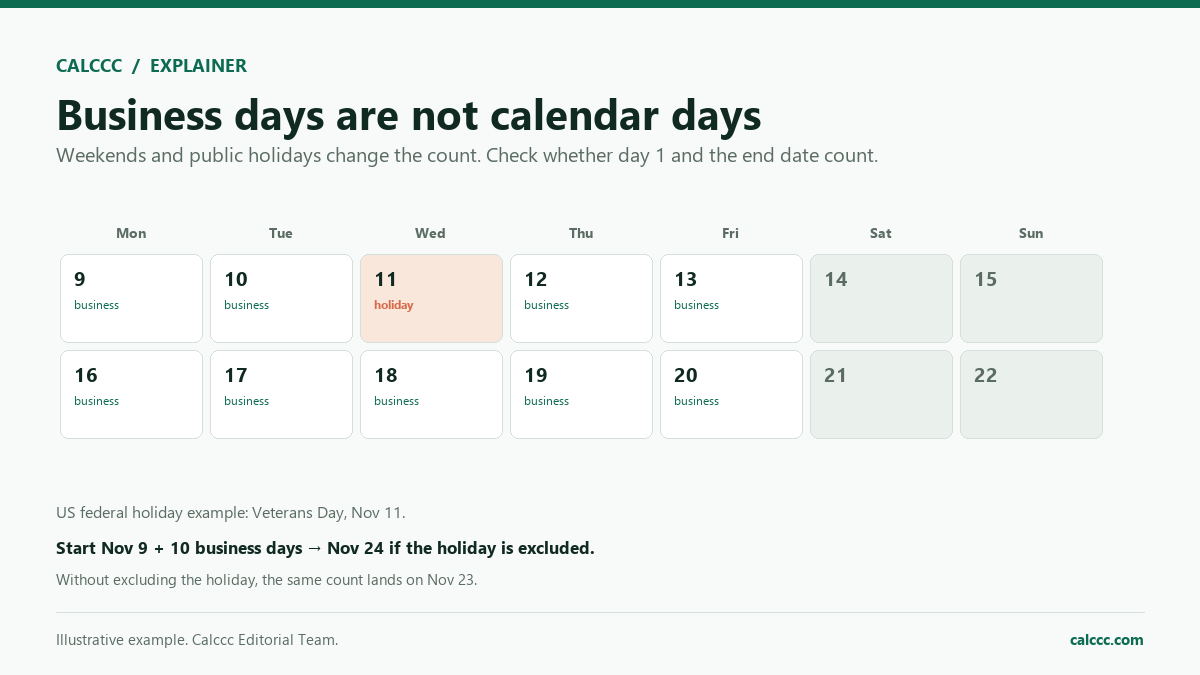
- You need business days only, excluding weekends and holidays.
- You need time-zone-aware differences between two instants.
What changes the result most
| Start and end dates | The order and exact dates determine the interval. |
|---|---|
| Inclusive counting | Counting both endpoints adds one day. |
| Time zone | Local dates can differ across time zones near midnight. |
How to use it
- Enter the start date and end date.
- Review the day difference, weeks, and calendar months.
- Open Advanced options to include the end date, choose a weekend pattern, or enter holidays.
- Check the adjusted business-day count.
- Use the result for planning, not as a legal deadline calculation.
How it works
Example calculations
Example 1: two months
From January 1, 2026, to March 1, 2026, is 59 days, or 8 weeks and 3 days. That is exactly 2 calendar months, and there are 42 weekdays in the range.
Example 2: a holiday-season span
From September 15, 2026, to December 25, 2026, is 101 days, or 14 weeks and 3 days. The calendar difference is 3 months and 10 days, and the range contains 73 weekdays. Thanksgiving and Christmas are not subtracted.
Example 3: a summer quarter
From June 1, 2026, to September 1, 2026, is 92 days, or 13 weeks and 1 day. That is 3 calendar months and 66 weekdays, which is useful for planning a summer work or school schedule.
What the result means
The best unit depends on the question. Use total days for legal deadlines and travel counts, weeks for schedules, and months or years for leases, memberships, and long projects. Business days are useful when something can only happen on a weekday, but remember that this count includes federal holidays and local holidays. If a deadline is stated as a number of days, check whether the start date or the end date is meant to be included; that one-day difference can matter. The calculator does not know about time zones, daylight saving changes, or partial days, so it treats each date as a full calendar day.
Common mistakes
- Counting both the start date and the end date when only elapsed time is needed.
- Assuming every month has 30 days instead of using actual calendar months.
- Treating business days as weekdays minus holidays when holidays are not included.
- Forgetting that a deadline stated in days may include or exclude the start date.
- Ignoring time zones when the two dates come from different locations.
Assumptions and limits
- Both dates are in the Gregorian calendar.
- The start date is not counted as a full elapsed day.
- The end date is not included in the day or business-day count.
- Business days are Monday through Friday, with no holiday calendar applied.
- Each date is treated as a whole day at midnight, with no time zone adjustment.
Frequently asked questions
Is the end date included?
By default, no. Set Include end date to Yes if you want to count it.
Which days count as business days?
Monday–Friday by default. You can choose Friday–Saturday, Sunday only, or no weekend exclusion.
Are public holidays detected automatically?
No. Enter the number of holidays that fall on a business day and the calculator subtracts them.
How are calendar months counted?
Months advance from the start date; month-end dates are clamped. It is a calendar difference, not an average of 30 days.
What if the end date is earlier?
The difference is shown in absolute days and flagged as reversed.
Can I use this for legal deadlines?
Only as a planning aid. Court, payroll, and contractual rules may count days differently.
Sources
2026 update
How to use the professional output
This page is not just a formula box. The result is designed to be checked, compared, and taken away.
- Professional worksheet. The result includes the inputs used, the method and scope, and a one-variable sensitivity check for finance calculators.
- A/B scenarios. Save two input sets in the browser and compare the primary, secondary, and breakdown figures side by side.
- Print / PDF and CSV. Print a branded worksheet, or export the year-by-year table when the calculator produces one.
The formulas and assumptions above still govern the number. The worksheet makes the estimate auditable; it does not make it a lender quote, tax return, or personalized advice.
Go deeper