


Key takeaways
- Green is fixed. Do not move a green character in later guesses.
- Purple is a placement clue. The character is in the equation, but not in that position.
- Black is information. Remove the character unless the equation rules leave an exception.
- Open with a mix. Your first guess should test common digits and operators.
- Daily mode is a shared baseline. Same equation, one attempt, no spoiler in the share.
How the feedback works
A green tile means the character is correct and in the right position. A purple tile means the character appears elsewhere in the equation. A black tile means the character is not in the equation, subject to duplicate-character counting. The game is a constraint puzzle: every guess narrows the set of legal equations, and the best next guess tests the most uncertainty.
Choosing an opener
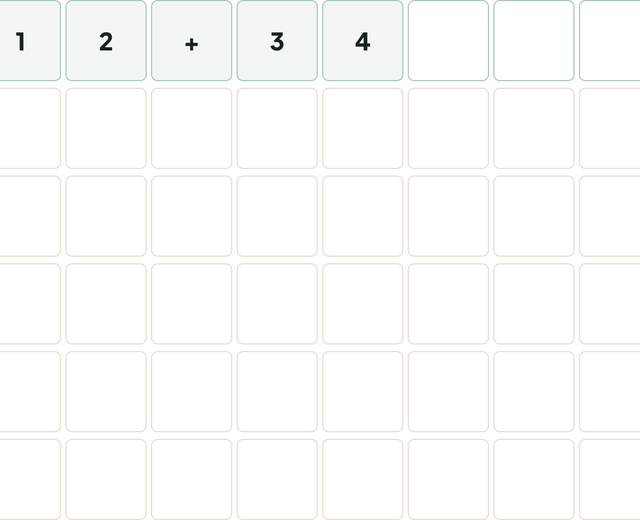
Open with a mix of digits and operators rather than a single repeated digit. An equation has structure: digits, one operator, an equals sign, and a result. A guess such as 12+34 tests four digits, one operator, and the equals sign in one line. Avoid a guess like 1111 unless you are deliberately testing a duplicate rule; it spends four positions on one character.
Using green and purple together
Green characters are anchors. Keep them in place and build around them. Purple characters are more subtle: if a purple 3 appears in position 2, you know a 3 exists elsewhere, but not where. Before moving it, check whether the equation’s arithmetic narrows the possible positions. For example, if the result must be two digits, a leading 0 is impossible; if the operator is multiplication, the result is constrained by the factors.
Handling duplicates
Duplicate characters are where many players misread the feedback. If the equation contains two 3s and your guess contains one 3, a purple 3 does not prove that both positions are wrong; it only says the guessed 3 is not in that spot. Count how many copies of a character the target can contain before you eliminate it entirely.
Mode ladder
Classic 8 is the standard length. Mini 6 is a shorter warm-up, Maxi 10 adds longer equations, Instant gives one attempt, and Speed adds a clock. Use Instant only after your opener and second guess are reliable; it removes the recovery time that makes the standard mode learnable. Speed is a performance mode, not a learning mode.
Daily Number and sharing
Daily Number uses a seeded equation for the date, so everyone gets the same target. The share result should show the colour grid and the number of guesses, not the equation. That is the daily-puzzle contract: enough information to compare, not enough to spoil. The daily board is also a good way to track whether your opening guesses are improving.
A better second guess
After the opener, choose a guess that tests two or three new digits and one new operator position. Repeating the same equation shape may feel safe, but it produces little new information. If the first guess revealed two greens, keep them and change the other characters; if it revealed only blacks, change both the digits and the operator.
Write down the constraints you have proved: a digit that must appear, a position that cannot hold a digit, an operator that is still possible. The game becomes much easier when the feedback is translated into a short constraint list instead of a row of coloured tiles. On Instant mode, this list is the only thing between a win and a wasted attempt.
Track your opener
Keep a note of which opener produced the most information over ten daily equations. A good opener is not the one that gets lucky; it is the one that reliably reveals a mix of digits and at least one operator position. Change one variable at a time and compare the results over a week.
If the opener gives three blacks, change both the digits and the operator. A second guess that only changes one character is often too conservative.
Common mistakes
Moving a green character. A green is already solved. Treating a purple as a black. Purple means present, not absent. Ignoring arithmetic. The equation must be mathematically true; use that constraint. Guessing the same shape twice. If a guess gives little new information, change the mix of digits and operators.
Practice
Play Calccc Daily Number in Classic 8 for the standard loop, then try Mini 6 for a faster round. Use Daily for a shared equation and Speed only when the basic feedback logic is automatic.
Rules and goal
Daily Number puzzles give you numbers and target arithmetic. Use each number once and combine with +, −, ×, and ÷ to reach the target. Work backward from the target and look for near-misses. Multiplication and division create large jumps; addition and subtraction fine-tune.
Strategy
Start with the largest numbers or the numbers that combine to a near-target. If the target is even, look for a product or a sum that gets close. Keep a written expression; a correct answer needs the operations and the numbers used once.
Common mistakes
Using a number twice; losing track of parentheses; and stopping at a near-miss. Check the expression with the order of operations before submitting.
What to compare
Compare the result with the target and verify each number is used exactly once. A different expression that reaches the target is also valid.
Frequently asked questions
What do the colours mean in Daily Number?
Green means the character is correct and in the right position. Purple means it appears elsewhere. Black means it is not in the equation, subject to duplicate counting.
Is Daily Number the same as Wordle?
It uses the same feedback loop, but the target is a mathematical equation rather than a five-letter word. Operators and digits replace letters.
Further reading